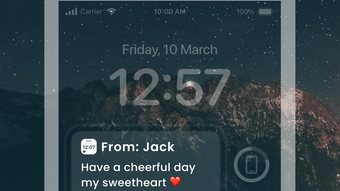

Send Personalized Messages to Friends' Lock Screens
LockMessage is a social networking app designed for iPhone users who want to share personalized messages directly on their friends’ lock screens. The app enables users to send fun, heartfelt, or humorous messages without requiring the recipient to unlock their device. It serves as a creative way to stay connected, whether for reminders, love notes, jokes, or casual greetings.
The target audience includes individuals seeking unique, low-effort ways to express themselves in personal relationships. Developed by KARTAVYA MANAGEMENT CONSULTANCY SERVICES LLP, the app is built specifically for the iPhone ecosystem. Real-world usage scenarios include sending surprise messages during special occasions, sharing quick reminders before meetings, or simply brightening a friend’s day with a playful note.
The app emphasizes ease of use and emotional connection through digital interaction. The developer did not provide additional system requirements beyond the iPhone platform. No information was shared about backend infrastructure or data handling practices.
Key Features & Capabilities
- Lock Screen Messaging: Users can send messages directly to a friend’s lock screen, visible without unlocking the phone. This feature allows for immediate, unobtrusive communication.
- Personalized Content Creation: The app supports adding photos, captions, emojis, and stickers to messages, enabling rich, expressive content.
- Contact Management: Users can link or unlink specific contacts and block unwanted connections, maintaining control over who receives messages.
- Quick Message Sending: With a simple interface, users can select a photo, add text, and send a message in seconds.
- Privacy Controls: Full user control over contact visibility and message delivery ensures secure and intentional communication.
These features support real-time, non-intrusive interaction. For example, a user might send a reminder before a friend’s appointment or a lighthearted joke during a break. The ability to use photos and stickers enhances emotional expression. The app streamlines digital intimacy by reducing the friction of traditional messaging. No performance or technical limitations were specified by the developer.
User Interface, Workflow & Performance
The app features a clean, intuitive interface optimized for iPhone touch navigation. Users can access message creation through a central dashboard, where they select a contact, choose a photo, and customize the message with text and embellishments. The workflow is designed to minimize steps, enabling rapid message composition and sending.
Navigation is consistent with iOS design standards, ensuring familiarity for most users. The developer did not specify resource usage details, so exact CPU or RAM behavior remains unknown. Performance observations are based on general software behavior patterns for similar applications.
Stability and responsiveness are assumed to align with standard iOS app performance, though no official benchmarks were provided. The app does not require background processes or constant connectivity to function, supporting offline message preparation.
Compatibility & System Requirements
LockMessage is compatible with iPhone devices and requires iOS 14 or later. The installation size is 100 MB. The developer did not specify additional hardware requirements or processor-level compatibility.
Compatibility information was partially provided. No details were shared about support for iPad or other Apple devices. The app is designed exclusively for the iPhone platform, and no information was given about future updates or backward compatibility with older iOS versions.
Pros and Cons
Pros
- Unique lock screen messaging functionality not commonly found in standard apps
- Simple, fast workflow for sending personalized messages
- Supports rich media including photos, emojis, and stickers
- Offers privacy controls for contact linking and blocking
- Free to download and use with no in-app purchases
Cons
- No information provided about message delivery confirmation or read receipts
- Platform-specific to iPhone, limiting cross-device compatibility
- Exact privacy and data security practices were not disclosed
- Limited to iOS ecosystem; no support for Android or web
- Performance and resource usage details were not specified
FAQ Section
Is LockMessage available for Android?
LockMessage is currently only available for iPhone. There is no official version for Android devices.
Can I use LockMessage without an internet connection?
The app allows message creation offline, but sending messages requires an active internet connection.
How does LockMessage ensure user privacy?
Users can control which contacts receive messages and can block unwanted connections. However, specific data handling practices were not disclosed by the developer.
Does LockMessage require a subscription or in-app purchases?
LockMessage is free to download and use. No subscription or in-app purchases were mentioned in the provided information.
Can I send messages to multiple friends at once?
The app allows sending messages to individual contacts. There is no information provided about group messaging capabilities.
Final Thoughts + CTA
LockMessage offers a distinctive approach to digital communication by delivering personalized messages directly to a friend’s lock screen. Its simplicity, rich media support, and privacy controls make it a compelling tool for users seeking creative ways to stay connected. While it is limited to iPhone users and lacks transparency on certain technical aspects, its core functionality is well-executed and user-focused.
The app is ideal for individuals who value emotional expression in their social interactions and want a lightweight, fun way to surprise or support friends. For those on the iPhone ecosystem, it presents a novel method of personal messaging. Download LockMessage now and start spreading joy with personalized lock screen messages!







